
Why Your Business Really Needs a Shopify Consultation
Tue, 18 Nov 2025

Follow the stories of academics and their research expeditions

Table of Contents
Workflow Diagram: What it is, How to Create, Types and its Uses
What is a Workflow Diagram?
Workflow Diagram: Symbols and Shapes
5 Steps to How to Create a Workflow Diagram
Types of Workflow Diagrams
What is the Use of a Workflow Diagram?
Concluding Thoughts
A workflow diagram visualizes and outlines a series of actions to simplify daily tasks and operations to drive improvement, productivity, growth, benefits, and many more in the business. Moreover, a workflow analysis assists in the breakdown, systematizing, pointing out critical areas, or exposing the roadblocks in your work process.
Having a workflow diagram helps to graphically visualize and help employees understand their tasks and in the manner which the work can be achieved. Drafting, designing, and using a workflow is even essential and reliable for a wide number of companies as it makes processes clear.
Gather all the information about workflows, symbols, and how to use and create workflow diagrams that accelerate your professional processes.
A workflow diagram (workflow chart) is a visual layout of a business process. The diagram gives an overview of the various activities through symbolic representation that indicates conditions and any requirements that account for the stage to complete the overall work.
In general, a workflow diagram is for getting clarity and responsibility for imparting the steps for each activity, assigning the resources, and the order of the event cycle.
Most industries apply workflow visualization for documentation, performance goals, and executing business process mapping. This helps the companies and their employees to keep up with any changes in a process to build consistent business efficiency and initiate real results.

Here are the most common flowchart symbols and shapes you can use while creating a workflow chart,
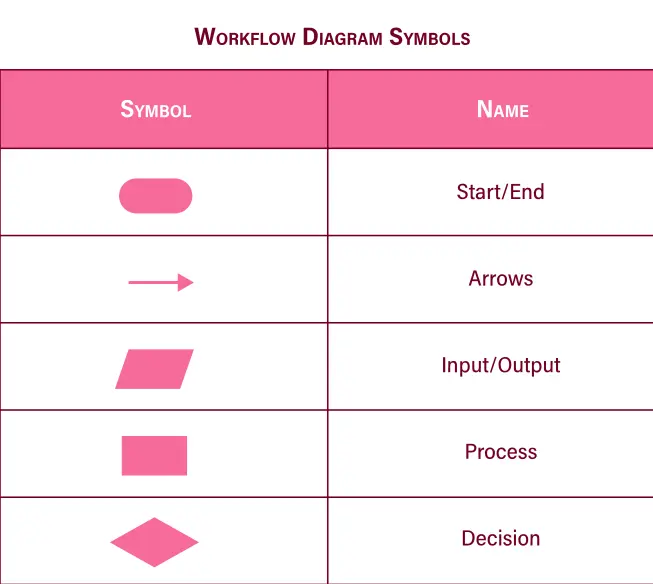
Oval: An oval indicates the start or end point.
Rectangle: A rectangle represents a process of a step, action, or state.
Diamond: A diamond shows a decision point in the flow.
Circle: A circle is a connector that represents a point at which the flowchart connects with another process
Arrow: An arrow indicates relationships between the representative shapes
Below is a step-by-step guide to creating a successful workflow diagram:

1) Determine the Objective
Firstly, discovering the objective and position of diagramming to deal first is vital to create a workflow diagram. One must have a clear view of the order of business processes rather than ending up with complex visual layouts.
It is necessary to show how the process would come into effect and how it will take place from beginning to end in an accurate process. This means stating the purpose of the schematization to gather data to describe the workflow.
2) Collect Information
The second step is to store relevant information possible and applicable to your process of diagramming. Hand-in-hand cooperation with diverse employees and teams to assemble data plays effective. It also shows the way how information is processed and can be used in designing the right visual representation for your workflows. Gathering data helps to chart the lists of tasks to be taken for each step that outline as per your work plan.
The core logic is to use data to enhance proper workflow with time management, resources count, responsibilities, decision-making, potential work barrier, and improve scope.
3) Design the Workflow Diagram
Thirdly, start drafting and designing your workflows right after figuring out and mapping out the list of activities. You can use a marker pen and a board or the workflow diagramming tools to brace your diagramming attempts. This helps to get the best ideas and methods to different stages for your business success.
This step gives a bird-eye view of the level of steps involved in the process that can be consistent, repetitive, and productive within a network.
4) Revise and Submit the Final Design
During this phase, share the final business workflow diagram with your team members to ensure that everyone gets the steps and roles to execute the process. In this way, you can also access their inputs and bring beneficial changes by mapping out processes for the various departments.
Ask for feedback from the project stakeholders and employees about the ideal versions of the processes. This helps to ensure that all work standards are being met from their side as well as boosts good relationships in your business.
5) Follow Up, Examine, and Improvise
By having the entire process of your business document, it gets simpler to identify potential issues, gaps, and blockage areas. Examine the diagramming to decide which activities to be streamlined, automated, or eliminated.
This way, you can categorize levels of priority tasks, divide tasks, find solutions to eliminate errors, examine gaps, and bring improvements by optimizing the workflow. The workflow layout aids to precede your company in the bigger picture that aligns with future goals.
There are many types of workflow diagrams. The following are the 5 most used diagrams:
- Process flowchart
- Top-down flowchart
- System diagram
- Schematic flow
- Block diagram

Workflow allows people to design, execute, and control interrelated activities or processes of new or old through a network. It is a standard visual layout that gives exposure to broad goals during the stage of activities. A workflow diagram takes place between the business process map and business process automation. These process maps give detailed process steps that your clients or collaborators need with starting the work.
Although workflow diagrams are utilized mostly in manufacturing industries, the benefits of workflow management systems are applicable to diverse industries.
For example:
- A process to improvise control of business processes.
- An estimate to grow engagement, loyalty, and relationships with customers.
- An activity to improve the quality of services, and automate and enhance manual tasks.
- A process to reduce training costs.
Some of the areas of use involve,
Healthcare: Hospitals and medical industries can use workflow diagrams to demonstrate steps and movements held through a process.
Armed Services/Military: The diagram provides the steps and activities that illustrate different responsibilities or roles. For example, it is used in processes taken for deployment, transfer, and promotion.
Finance: One of the vital use of workflow diagrams in economics, commerce, banking, or other money matters is process documentation. It can get hectic without analyzing the flow of activities that include billing, tax management, accounts payable, financial planning and analysis, and financial close.
Education: This is a great workflow diagram tool when showing the steps of various activities of an academic concept. For example; Enrolling, Admissions, and Certification.
Retail: This breaks up the workflow of steps to help with inventory, purchasing, accounting, customer service, or other business processes.
Construction: A workflow diagram can show the process for managing, tracking, and identifying changes to particular and diverse types of construction projects. The objective is to smoothen quality that is consistent from planning to building to closing projects.
Basic workflow charts are easy to create using shapes that are even simpler. Whereas, the creation of a major workflow diagram depends on the number of data gathered that may require to use of the word, excel, or workflow diagram software to make complex information simple.
By opting to use workflow diagrams, you can break down your lists of tasks process to a higher level of sanity and improve businesses. The diagramming is relevant for multiple companies to recognize different steps that will involve in executing their work process. For instance: Project Management, Finance, Medical, and others.
Likewise, individuals aiming to enhance their career skills can enroll in Sprintzeal’s PMP Certification Training Course.
You can also visit Sprintzeal’s all courses and explore more options and earn the certification that suits your interests.
For any queries or to know about certification details, chat with our course expert
Tue, 18 Nov 2025
Tue, 18 Nov 2025
Fri, 14 Nov 2025
Subscribe to our newsletter to receive the latest news and promotions.

 USA : +1 315-666-4287
 UK : +44 7700 174870
 IND : +91 90361 08389
 AUS : +61 480 005 455
Leave a comment